Remove current installation:
sudo apt remove update-notifier update-notifier-commonInstall new:
sudo apt-get update -y
sudo apt-get install -y update-notifier-common
Remove current installation:
sudo apt remove update-notifier update-notifier-commonInstall new:
sudo apt-get update -y
sudo apt-get install -y update-notifier-commonTo help prevent/slow any brute force attacks while still having SSH enabled, its a good idea to change your SSH port from the default 22 to something at least 5 digits.
Install “netstat”:
sudo apt install net-toolsCheck to see current SSH port:
sudo netstat -tulnp | grep ssh
Check to see current sshd_config configuration:
grep -i port /etc/ssh/sshd_config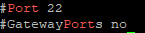
Open the sshd_config and search for: “#Port 22”
sudoedit /etc/ssh/sshd_config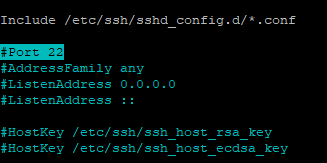
Uncomment and change the port number to your preference
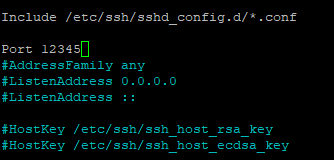
Save sshd_config and restart SSH service:
sudo systemctl restart sshdConfirm SSH daemon now listens to new port:
sudo netstat -tulpn | grep sshIf necessary add new port to firewall:
sudo ufw allow 12345/tcpRemove old ports:
sudo ufw status
sudo ufw status numbered
sudo ufw delete #After running command sudo docker stop <container> I received the below error.
Error response from daemon: cannot stop container: storagenode: permission deniedsudo aa-remove-unknownShutdown
sudo docker stop -t 300 storagenodeStart
sudo docker start storagenodeList containers
sudo docker container lsUpdate Ubuntu
sudo apt update
sudo apt upgrade -y
sudo reboot
Set Synology to auto-update.